WCAG Accessibility 1: WordPress Accessibility Audit (Rainbows Ireland Case Study)
This is the first post in our WCAG Accessibility series, where we document a step-by-step approach to auditing and improving accessibility on a live WordPress website.
View the full WCAG Accessibility Series
As part of an ongoing accessibility review, we recently carried out a WordPress accessibility audit of the Rainbows Ireland website.
The goal at this stage was simple: identify the key accessibility issues before making any changes.
Rather than jumping straight into fixes, we focused on understanding:
- where users may experience difficulties
- how the site performs against WCAG 2.1 guidelines
- which issues are critical versus secondary
Tools Used for the WordPress Accessibility Audit
We used two industry-standard tools to assess the site:
- WAVE (Web Accessibility Evaluation Tool)
- Google Lighthouse (Accessibility Audit)
These tools provide a strong baseline for identifying common accessibility issues, particularly around:
- colour contrast
- form usability
- semantic structure
- ARIA usage
Initial Results
WAVE Analysis
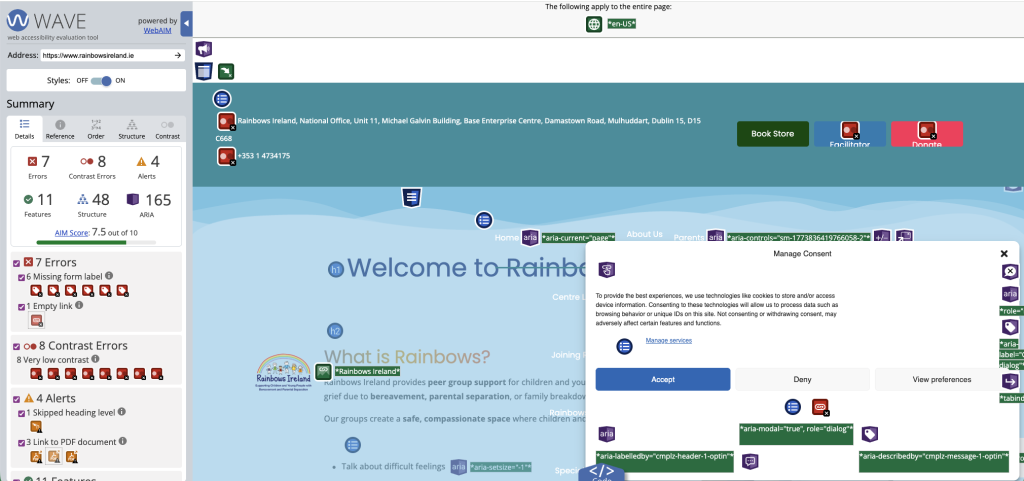
The WAVE audit of the Rainbows Ireland homepage highlighted a number of issues:
- 7 Errors
- 8 Contrast Errors
- 4 Alerts
The most notable problems included:
- missing form labels
- low contrast text, particularly in navigation and buttons
- empty or unclear links
- structural issues such as skipped heading levels
This is fairly typical of many modern WordPress websites, particularly those built using page builders and multiple plugins.
Lighthouse Accessibility Score
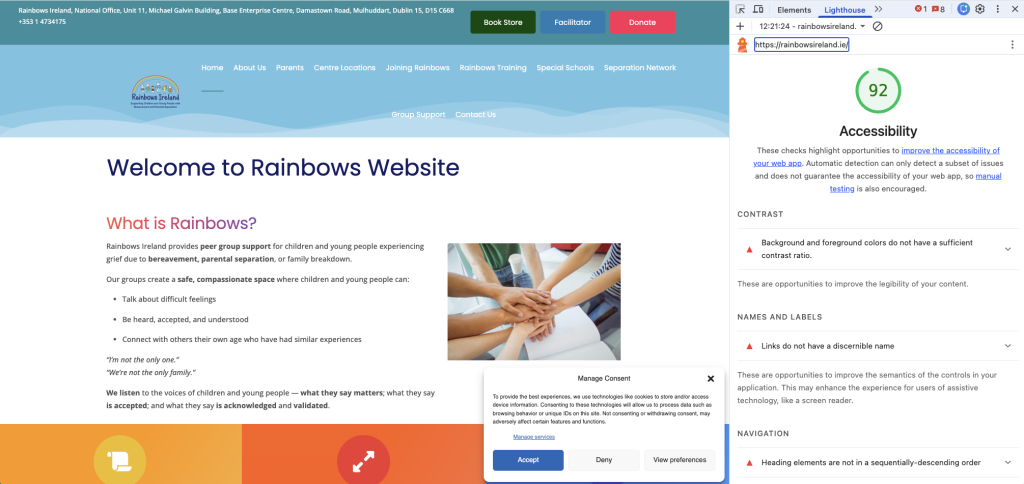
The Lighthouse audit returned an Accessibility score of 92.
While this appears high at first glance, it is important to understand:
A good Lighthouse score does not mean a site is fully accessible.
The audit still flagged issues such as:
- insufficient colour contrast
- links without discernible names
- heading hierarchy problems
These are all areas that can significantly impact users relying on assistive technologies.
Key Observations from the Audit
1. Critical Issues to Fix
- colour contrast failures
- missing form labels
- poor link descriptions
These directly affect usability and WCAG compliance.
2. Structural and Best Practice Issues
- heading order, such as skipping from H1 to H3
- ARIA attributes not fully aligned
These may not completely block users, but they still reduce accessibility quality.
3. Plugin-Generated Issues
Some warnings and errors originate from third-party plugins, such as:
- cookie consent tools
- carousels and sliders
- lightbox components
These require a more balanced approach:
- fix where possible
- document where limitations exist
Why the Audit Stage Matters
Skipping the audit stage often leads to:
- unnecessary fixes
- missed critical issues
- inconsistent results
By starting with a structured audit, we can:
- prioritise the most important fixes
- apply consistent improvements across the site
- ensure measurable progress
What Happens Next
In the next post, we will look at how we addressed the most common issues identified in this WordPress accessibility audit, including:
- fixing colour contrast across the site
- improving typography and link visibility
- applying global CSS overrides within Elementor and Jupiter X
Summary
The initial audit of the Rainbows Ireland website revealed a range of typical accessibility issues found in many WordPress builds.
While the overall Lighthouse score was strong, deeper analysis showed clear opportunities for improvement, particularly around contrast, forms, and navigation.
This audit forms the foundation for a structured, practical approach to achieving WCAG compliance.